Users often open a shared mobility app with a clear intention to book a vehicle. But if there is no suitable car, scooter, moped, or bike within walking distance at that moment, they may simply close the app and move on.
For operators, this means lost demand. The user was ready to start a trip, but vehicle availability did not match the user’s location and timing.
CT Mobility’s Radar feature helps recover these missed booking opportunities by continuing the search in the background and bringing the user back when a suitable vehicle becomes available nearby.
What is the Radar feature?
Radar is a vehicle search tool that lets users monitor a selected area and receive a notification when a suitable vehicle becomes available nearby.
Instead of reopening the app several times to check the map, users can
- set a search radius
- choose how long the search should run
- filter by vehicle model
- select when the search should start
- repeat the search on selected days
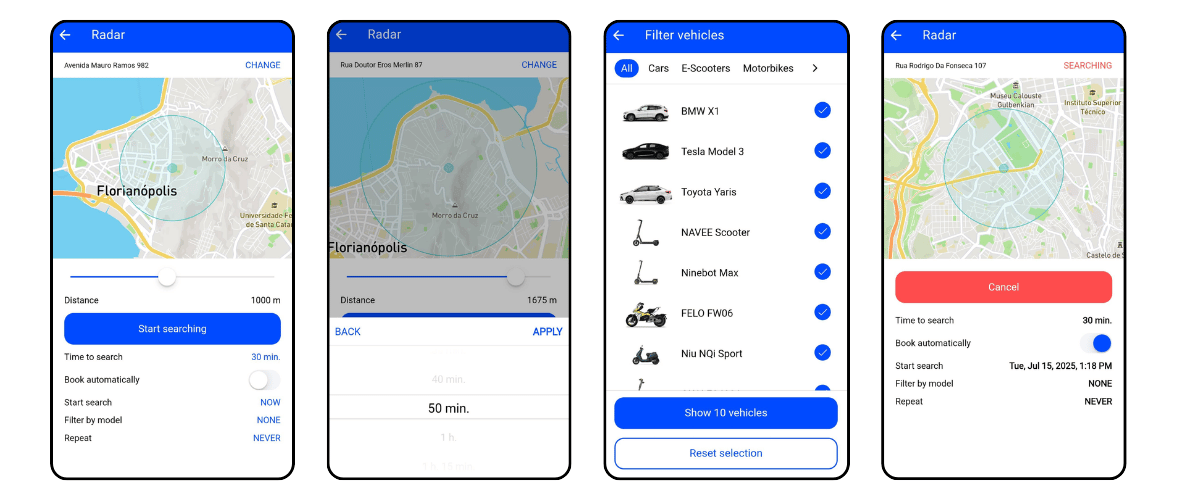
For example, a user can set Radar to search within 1 km of their location for 30 minutes. If a vehicle appears within the selected area, the user receives a push notification and can return to the app to book it. If automatic booking is enabled, the system can book the vehicle for them.
This makes the notification directly connected to the user’s intent: they were looking for a vehicle, and the app notifies them only when there is something relevant to book.
Manual Radar for users
Users can create a Radar manually from the app. They can select the search location, set the distance, define how long the search should run, and choose whether the vehicle should be booked automatically when found. They can also start the search immediately or schedule it for a later time, filter results by vehicle model, and repeat the search on selected days.
Manual Radar gives users a practical alternative to checking the map again and again when vehicle availability is limited.
Automatic Radar for users who leave without booking
CT Mobility also supports an automatic Radar scenario designed to bring users back after an unfinished booking session.
Here is how it works: a user opens the map and checks available vehicles but does not create a booking. If the user has not made any new map requests for more than 30 minutes and has not booked a vehicle, CT Mobility can automatically create a Radar based on the user’s last known location. The system then starts searching nearby in the background. Only when a vehicle appears within the configured radius does the user receive a notification, such as: “We found a vehicle near you.”
This way, the notification is sent only when there is a vehicle available nearby.
Why Radar matters for shared mobility operators
Radar helps shared mobility operators reconnect with users who opened the app but did not complete a booking.
In many cases, users leave not because they changed their mind, but because there was no suitable vehicle nearby at that moment. Radar keeps the search active and brings the user back when vehicle availability changes.
For operators, this can support several important goals.
Higher conversion from map sessions
Users who open the vehicle map already show booking intent. Automatic Radar gives operators another chance to convert that intent into a trip.
Better user experience
Users do not need to reopen the app repeatedly to check the map. The system searches in the background and notifies them when a suitable vehicle becomes available.
More relevant push notifications
The notification is connected to user behavior and actual vehicle availability. It is sent only when there is something available nearby.
Improved fleet utilization
When a vehicle appears in an area where a user has recently searched, Radar can help bring demand back to the app faster.
Radar works through CT Mobility’s existing vehicle search, map, booking, and push notification infrastructure, so operators can use it without building a separate workflow.
For shared mobility businesses, this means fewer missed booking opportunities and a more convenient way to connect available vehicles with users who are ready to book.
Launch your vehicle sharing app in just 15 days with CT Mobility!
No setup fees. Unlimited features.
Free trial period.





.png)