Thursday, 08:15, the ops desk of a car sharing service in Dubai. Six cars on the morning map aren’t on a trip and haven’t sent anything for a while: three from just before midnight in the same car park, one from late last night, one from Tuesday afternoon and one that went quiet half an hour ago. The ops lead has two technicians on shift and a booking at 10:30 on one of the six. Who goes where? The fleet, the cars, the zones and every time below are an illustrative example, not a customer case, and no results are claimed.
Short answer: Keep three things apart for every quiet car: its last known position, the time of the device’s last message, and its booking state. Pull all three for all the quiet cars in one go and sort before anyone drives out. A car with a booking coming up goes first. Cars that went quiet together in one place get one visit. A car that went quiet minutes ago gets another look from the desk. Each visit is a task the lead creates, with the last known position and time written into it.
Last updated:
November 19, 2026

By hand, this is the slow part of the morning. Open each car in the console, note when it last reported, find it on the map, switch to bookings to see whether a customer is about to walk up to it. Six cars, three screens and a notepad. By the time the list is done the first booking is close, and the technicians are already asking where to start.
The quick alternative is to send both of them to the oldest dots and sort it out on site. That spends the morning driving, and the car with the 10:30 booking isn’t the oldest one.
Three pieces of information sit next to each other on the screen and get read as one. They answer different questions.
The last known position is where the car was when its device last reported. It’s where you send someone and where they start looking. Whether the car is still there, the position can’t say.
Freshness is the time of that last message. A time only means something next to how often that car normally reports, and that depends on your devices and how they’re set up. It’s a number your team has to know or find out. The team in this walkthrough looks at any parked car that has been quiet for more than 30 minutes. That’s their line, drawn from their own cars. Yours may be shorter or longer.
Booking state is what the platform has the car down as. Our post on field operations after the trip ends lists what an operator needs to see: whether the vehicle is “available, in use, booked, in parking mode, under maintenance, offline, blocked, or waiting for inspection.” Offline is on that list as a status, and in CT Mobility it’s a decision. A person switches a car offline when “something is wrong and it should not appear in the app.” A quiet device and an offline car are two separate things. Whether a quiet car stays bookable is somebody’s call, and at 08:15 nobody has made it yet.
Here’s the plain version. An old timestamp tells you when the platform last heard from the device, and nothing else. Broken, moved, stolen, occupied, out of coverage: each of those stays a guess until somebody is standing next to the car.
The lead has ChatGPT connected to the platform through the MCP server built into CT Mobility. (What to allow when you connect it, and what to keep with people, is in our guide to connecting ChatGPT and Claude safely.) The question goes in the way you’d type it to a colleague:
Ops lead: cars not on a trip with no message for more than 30 min. last known place, time of the last message, booking state, open alarms. read only
ChatGPT: 6 cars. The most recent is #214: its tracker stopped sending data at 07:42, last position in zone “Marina”. The oldest is #231, last message on Tuesday at 14:05 in “Deira”. #208 is booked for 10:30 today. None of the six has an open alarm.
Ops lead: when did each ones last trip end and where
ChatGPT: #208: Wednesday 22:02 in “Business Bay”, last message 22:04. #219, #223 and #227: trips ended on Wednesday between 17:50 and 21:30 in “Al Barsha car park”, last messages at 23:11, 23:14 and 23:16. #231: Monday 19:40 in “Deira”. #214: today 07:18 in “Marina”.
Ops lead: other cars parked in marina and al barsha car park, are they reporting?
ChatGPT: “Marina”: 5 other cars parked, last messages between 08:06 and 08:13. “Al Barsha car park”: no other cars there right now.
Put together, with a last column the lead fills in:
| Car | Last message | Last known place | Booking state | Open alarm | Lead decides |
|---|---|---|---|---|---|
| #208 | Wed 22:04, 2 min after its trip ended | Business Bay | Booked, 10:30 today | No | Technician 1, first, before 10:00 |
| #219 | Wed 23:11 | Al Barsha car park | Available | No | Technician 2, one visit for all three |
| #223 | Wed 23:14 | Al Barsha car park | Available | No | Same visit |
| #227 | Wed 23:16 | Al Barsha car park | Available | No | Same visit |
| #231 | Tue 14:05, parked since Mon 19:40 | Deira | Available | No | Switched offline until checked. Technician 1, after #208 |
| #214 | Thu 07:42 | Marina | Available | No | No task yet. Ask again at 09:00 |
No alarm on any of them. That leaves the lead where the morning started, since an empty alarm list says nothing either way.
What the table does offer is a few things to check, and none of them is an explanation.
#219, #223 and #227 went quiet within five minutes of each other in one car park. Three cars at once in one place and one car on its own are different questions to take to the site. Is there something about the place, or are these three separate things? The table can’t say. It does say one person can look at all three in one trip.
#208 went quiet two minutes after a customer ended a trip. #231 stood in Deira after Monday’s trip, kept reporting into Tuesday afternoon and then stopped. Give each technician that timeline along with the address. Someone on site who knows “trip ended 22:02, last message 22:04” asks better questions than someone looking for a dot.
#208 is also the only car anybody is counting on this morning, so it goes first even though it isn’t the oldest. #231 is the oldest. It has been on the map as available for two days with nothing coming from it, which is why the lead switches it offline until someone has seen it.
And #214 is the half-hour case. It ended a trip at 07:18, five other cars parked in Marina reported within the last ten minutes, and nobody has it booked. Thirty-three minutes is past the team’s line, but only just. The lead asks again at 09:00 before spending a technician on it.
Operator console · demo data
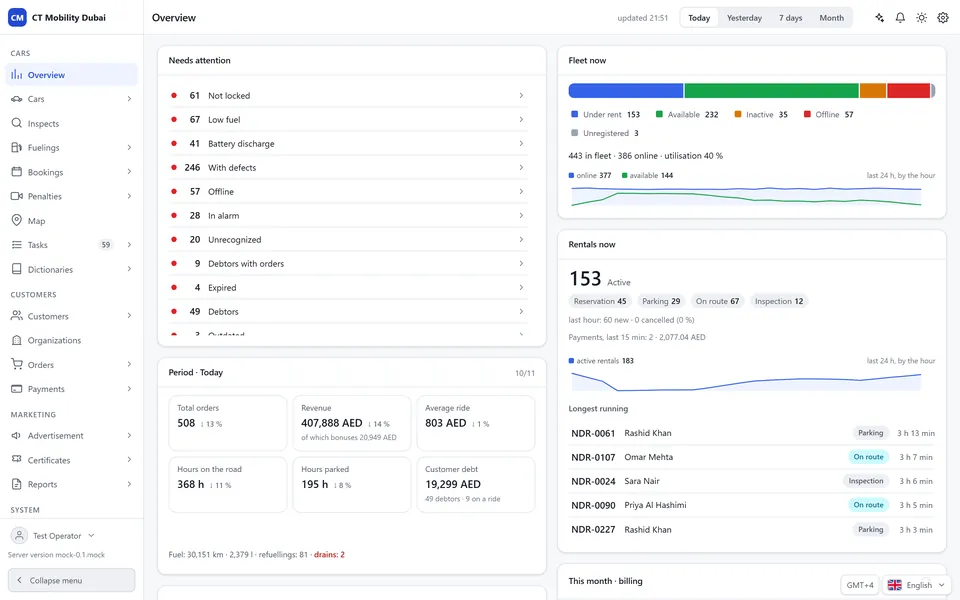
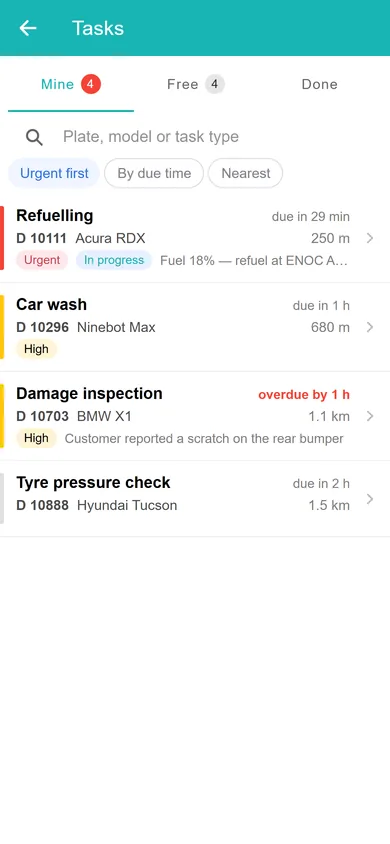
Fleet overview. Utilisation, active rentals, revenue in AED and the cars that need attention: the figures the assistant reads when you ask about your fleet. Technicians get a prioritised task list.
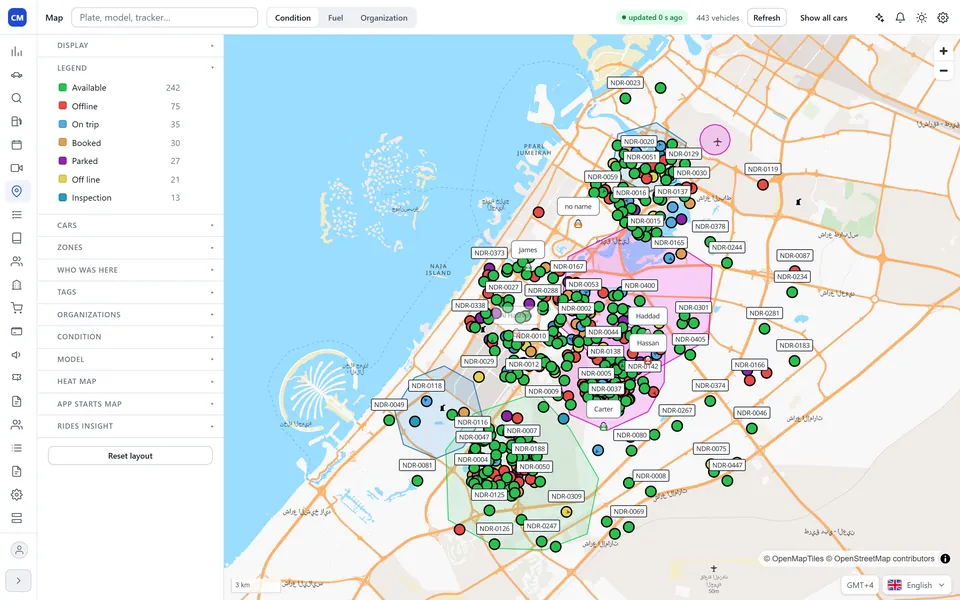
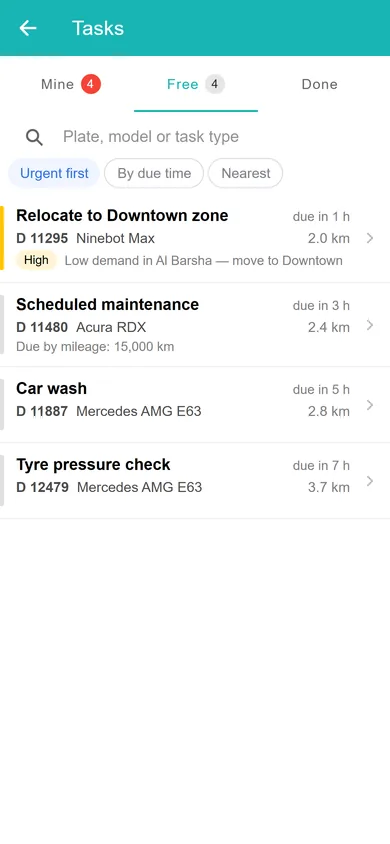
Fleet and field team. Every vehicle and its status on one live map. Open tasks wait in the technician app, where any free technician can take the nearest one.
The lead asks for one task per car for #208, #219, #223, #227 and #231, each with the last known position and the time of the last message written in, checks the preview and confirms. The five tasks are created for today, three with the technician going to Al Barsha and two with the one starting in Business Bay.
A task that says “check #219” sends someone out. A task that says “#219, Al Barsha car park, last message Wed 23:11, available, nothing booked” sends them out knowing what they’re checking against. What we’d want back from each visit, however your team reports it:
On control: Ask your fleet, the MCP server built into CT Mobility, works under each employee’s own login and permissions and is read-only by default. Changes work only if the employee allowed them when connecting, each one waits for a confirmation, and every call goes into the audit log. We enable it per installation, on request.
The same habit of reading the position together with its age runs through the Sunday morning with nine cars outside the zone. Quiet devices are also worth a question in the Thursday check of which cars aren’t ready for the weekend.
CT Mobility Solutions F.Z.C. · E-Commerce Hub BC-8, Ajman Free Zone C1 Building, Ajman Free Zone, Ajman, United Arab Emirates
The platform is multi-hardware and works with devices such as Teltonika. Compatibility is checked for each vehicle model, and if needed we can connect your equipment within a few weeks. More on IoT and telematics.
There’s no public price. We enable it per CT Mobility installation on request, so the quickest way to find out is to book a demo from the Ask your fleet page and ask about your fleet.
We have repeatedly proven this in practice with dozens of launched projects and years of successful work. Ask our clients who have tried several IT solutions but still remain with us.




