Thursday in early October, 14:00, and it’s still 38°C in Dubai Marina. Between tonight and Saturday night the rental desk has 38 cars booked: late arrivals at DXB on Thursday, JBR and Marina pickups on Friday morning, a two-day trip out to Hatta. The ops manager has four technicians on shift until 23:00 and wants to know which of those cars will let a customer down. The fleet, car numbers and times in this walkthrough are a demo, made up for the example.
Short answer: On Thursday afternoon, take every car with a confirmed booking up to Saturday night and check it for low fuel (where telematics reports it), open alarms, open service tasks and a parking spot away from where its booking starts. Sort by booking start, create field tasks only where none is open yet, confirm them and read them back. On Friday morning, check what was actually done.
Last updated:
November 10, 2026

A car is ready for a Friday booking when the customer can drive it away at the booked time and place without calling you. That comes down to four checks, and in most back offices they sit on four different screens:
None of it is hard. It’s slow, one screen at a time for 38 cars, and the late shift needs its list while there’s still time to drive across town.
All the cars here run on petrol. With electric cars, the same check works for charge only if your installation receives the battery level, so ask about that before you count on it.
The ops manager has ChatGPT connected to the platform and asks the way you’d ask a colleague:
Ops manager: cars booked from tonight 20:00 to saturday night. which ones arent ready? fuel under 25%, open alarms, open tasks, and parked away from where the booking starts. earliest booking first. read only
ChatGPT: 38 cars have a confirmed booking in that window, and 8 of them have something open. Fuel comes from telematics on 37 of the 38. #188 doesn’t report it, so I can’t tell you its level.
| Car | Booking starts | Car is now | What’s open | Open task |
|---|---|---|---|---|
| #112 | Thu 23:30, DXB Terminal 3 | Al Qusais | Fuel 18% | None |
| #140 | Fri 07:00, JBR, two days | JBR | Fuel 24% | None |
| #129 | Fri 08:00, Dubai Marina | Dubai Marina | Fuel 22% | Refuel, created today 09:10, not started |
| #127 | Fri 09:00, JBR | JBR | AC not cooling, reported on Tuesday | Workshop task from Tuesday, not started |
| #155 | Fri 10:00, JBR | Al Barsha | Wrong place; fuel 70% | None |
| #163 | Fri 10:30, JBR | Al Barsha | Wrong place; fuel 45% | None |
| #188 | Fri 12:00, Dubai Marina | Dubai Marina | Fuel not reported | None |
| #171 | Sat 08:00, Dubai Marina | Last position Wed 19:40, Dubai Marina | Alarm: tracker offline | Check tracker, assigned, not started |
ChatGPT: #112 comes first. It’s the only car booked tonight, and it needs fuel and a drive to Terminal 3 before 23:30. #129, #127 and #171 already have open tasks that nobody has started yet.
The manager knows something the system doesn’t: the customer on #140 told the desk they’re going to Hatta. For a day trip into the mountains the manager would rather the car leave with a bigger fuel reserve, so #140 moves up the list. One more question before anything is created:
Ops manager: the 127 AC task, who has it and is the part there?
ChatGPT: It’s assigned to the Al Quoz workshop team, status New. The task doesn’t say anything about parts.
So the manager calls the workshop. If #127 isn’t fixed by Friday 08:00, the reservations desk will pick another car for that 09:00 JBR customer. Nobody wants to hand over a car with a weak AC at 38°C.
Operator console · demo data
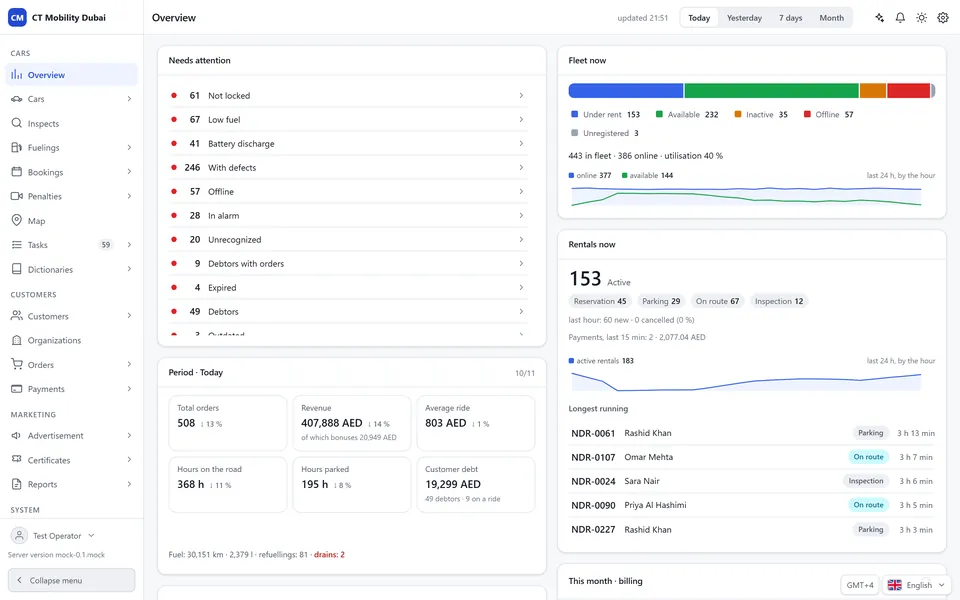
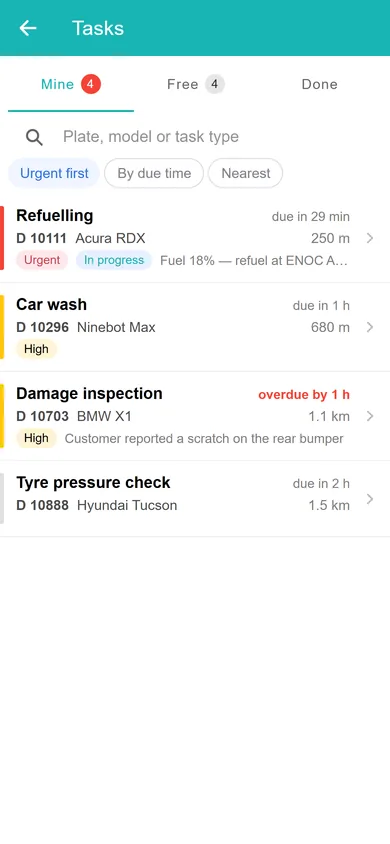
Fleet overview. Utilisation, active rentals, revenue in AED and the cars that need attention: the figures the assistant reads when you ask about your fleet. Technicians get a prioritised task list.
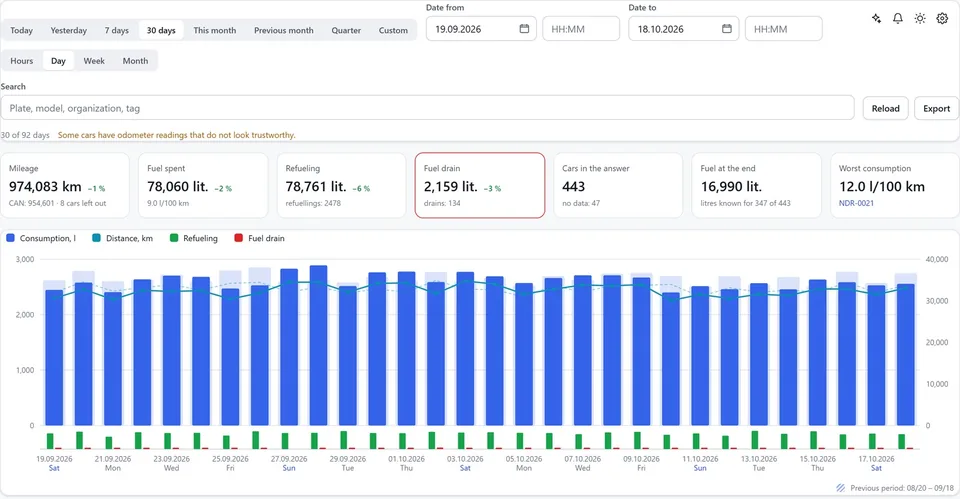
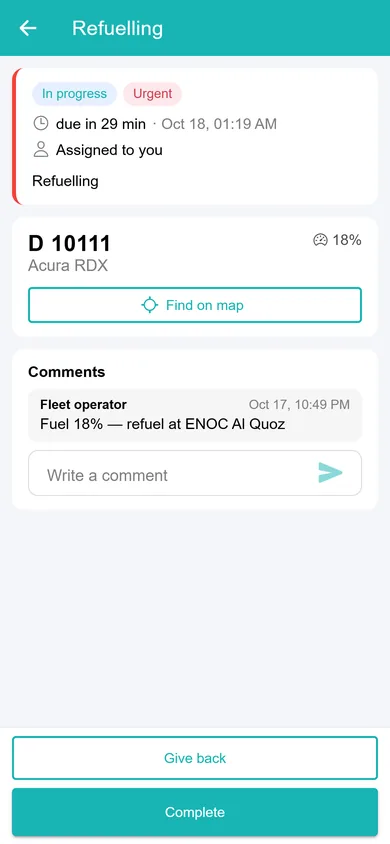
Fuel and mileage. Mileage, fuel spent, refuelling and suspected fuel drains per day for the whole fleet. A car low on fuel becomes an urgent refuelling task in the technician app.
Ops manager: propose field tasks for the rest. skip anything that already has an open task. due 1 hour before each booking
ChatGPT: Here’s the preview. Nothing is created yet.
| Task | Car | Zone | Due |
|---|---|---|---|
| Refuel and drive to DXB Terminal 3 | #112 | Al Qusais | Thu 22:30 |
| Refuel | #140 | JBR | Fri 06:00 |
| Move to JBR | #155 | Al Barsha | Fri 09:00 |
| Move to JBR | #163 | Al Barsha | Fri 09:30 |
| Check fuel on site, refuel if under a quarter | #188 | Dubai Marina | Fri 11:00 |
ChatGPT: Left out because a task is already open: #129 (refuel), #127 (AC), #171 (tracker).
Ops manager: give 155 and 163 to the same technician, back to back. rest is fine. confirm
ChatGPT: Created 5 tasks. Read back from the platform: #112 refuel and move to Terminal 3, due Thu 22:30; #140 refuel, due Fri 06:00; #155 and #163 move to JBR, both with the Al Barsha technician; #188 fuel check, due Fri 11:00. All five have status New. Each call is in the audit log under your name.
By 14:20 the five tasks are in the technicians’ app. Every car still has exactly the fuel it had at 14:00. A task is a job handed to a person, and the refuelling, the driving and the AC repair happen only when somebody does them.
On control: Ask your fleet, the MCP server built into CT Mobility, works under each employee’s own login and permissions and is read-only by default. Changes work only if the employee allowed them when connecting, each one waits for a confirmation like the one above, and every call goes into the audit log. We enable it per installation, on request.
Ops manager: yesterdays 5 tasks, which are done? anything new on cars booked before noon?
| Car | Task | Status | What the platform shows now |
|---|---|---|---|
| #112 | Refuel, to Terminal 3 | Done 22:05 | Rental started 23:41 |
| #140 | Refuel | New, not started | Fuel 24%, booking at 07:00 |
| #155 | Move to JBR | Done 21:30 | Position JBR, 06:28 |
| #163 | Move to JBR | Done 21:50 | Position JBR, 06:25 |
| #188 | Fuel check | Done 19:15 | Technician’s note: “about half, no refuel” |
ChatGPT: Nothing new on cars booked before noon. The #127 AC task is still open; the workshop added a note at 18:40: “compressor ordered, ready Sunday”.
Four of five done, and the one that isn’t is the Hatta car, half an hour before pickup. The shift lead calls the JBR technician, and the desk lets the customer know about a short delay. Why did #140 slip? Its 06:00 deadline was the earliest on Friday, and the JBR technician may simply have started the day elsewhere. That’s a guess to ask him about, the data doesn’t say. #127 is now the desk’s call: the 09:00 customer gets a different car.
On Friday evening the question shrinks to one customer and one car, and that’s our walkthrough of finding the nearest car a customer can actually take. If the Thursday list keeps showing the same cars parked in Al Barsha with no bookings near them, have a look at a one-week offer for idle cars. On Sunday morning a different list comes up: cars left outside the operating zone after one-way trips.
CT Mobility Solutions F.Z.C. · E-Commerce Hub BC-8, Ajman Free Zone C1 Building, Ajman Free Zone, Ajman, United Arab Emirates
Yes, as a rule you set up once. CT Mobility can send an alert when a car needs refuelling or its fuel drops suddenly, and send a field task to a technician automatically. See fuel and mileage monitoring. The Thursday question then finds those tasks already open, so nobody gets a second refuel task for the same car.
There’s no public price. We enable it per CT Mobility installation on request, so the quickest way to find out is to book a demo from the Ask your fleet page and ask about your fleet.
We have repeatedly proven this in practice with dozens of launched projects and years of successful work. Ask our clients who have tried several IT solutions but still remain with us.




