Most ops teams in Dubai already have ChatGPT open in a browser tab. They paste exports into it, draft customer replies, tidy up spreadsheets. The obvious next step is letting it read the platform directly so nobody has to export anything, and MCP is the plumbing for that. Our view, as a vendor that built an MCP server into its own platform: connecting is the easy part. Deciding what the AI may do once it’s connected is where the work is.
Short answer: An MCP (Model Context Protocol) server lets ChatGPT, Claude and other AI tools call your platform’s functions on behalf of a staff member. Start read-only, give every employee their own connection under their own login, make each change wait for a person’s confirmation, and keep a log of every call.
Last updated:
November 6, 2026

MCP, the Model Context Protocol, is an open standard for connecting AI applications to other software (modelcontextprotocol.io). A platform with an MCP server hands the AI a set of tools, such as “search trips” or “list vehicles with alarms”. You ask a question, the AI client calls those tools for you and answers from what comes back. Some sharing and rental platforms now ship an MCP server, and several telematics vendors have ChatGPT connectors. They differ a lot. Some expose a handful of read-only reports; others let the AI write data, top up wallets or send commands to cars. The protocol is the same in every case, so the interesting comparison is how each server controls writing.
In practice, almost everything a team asks in the first week is reading. On a Sunday morning, before the week starts, an ops manager might type:
Ops manager: which cars had no trips in the last 3 days?
ChatGPT: 6 cars. The longest gap is car #214: 5 days, parked in zone “Ajman yard”. 3 of the 6 are in Ajman yard, 2 at Head office, 1 in Marina. Want the full list with the last trip and fuel level?
That answer comes from our demo data, and it’s typical of the questions that save real time. Finance asks for unpaid fines in September grouped by driver, the week before the Salik and RTA bills get forwarded. Support asks why a customer was charged for 40 minutes of parking. Someone on the night shift asks which cars have open alarms right now. None of it changes a thing in the platform, which is exactly why we’d run a new connection read-only for the first few weeks and see what people actually use it for.
| Action | Suggested default | Why |
|---|---|---|
| Look up vehicles, trips, customers, payments, fines and zones | Allowed, read-only, within the employee’s role | That’s where most of the value is, and reading can’t break anything |
| Create a task for a technician | Allowed only if switched on, confirmed each time | Low risk, but it still sends people to work |
| Change a tariff or a zone | Confirmed each time, after a preview of exactly what changes | It affects every customer in that zone or tariff |
| Refunds, balance credits and charges | Confirmed one by one, with a reason, by staff who may already do this in the back office | Money: errors repeat quickly when an AI works through a list |
| Vehicle commands: open, lock, block the motor | Confirmed each time, with a reason recorded | A wrong command strands a customer or leaves a car open |
| Block a customer account, delete records, bulk changes | Keep with people in the back office | Hard to reverse and easy to get wrong at scale |
One trap: some setups offer a spending cap on automatic writes instead of confirmations. A cap sounds safe, but an AI working down a list of 200 customers can stay under any per-action limit and still make 200 wrong changes. We’d ask for a confirmation on every change and leave bulk work in the back office, where people already know the screens.
| Check | What a safe setup looks like | Question for the vendor |
|---|---|---|
| Read-only by default | A new connection can only read; writing is switched on deliberately | What can a fresh connection do before anyone changes a setting? |
| Own login and role | Each employee connects with their own account and the AI gets that person’s permissions, not a shared service key | Does the AI act as the signed-in employee, or as a technical user with wider rights? |
| Confirmation per change | Every change is shown and waits for a person’s confirmation | Is there any action the AI can take without a confirmation? |
| Reasons for commands | Vehicle commands and money actions record why they were done | Where is the reason stored, and who can see it? |
| Limits on writing | Bulk changes and money actions are limited or stay in the back office | Which limits exist on amounts, numbers of records or commands? |
| Audit log | Every call is logged: who, when, which tool, the arguments with secrets masked, the result | Can we export the log and see calls by employee? |
| Access you can revoke | Connections can be listed and switched off per employee | How do we cut off one employee’s AI access today, and how are access tokens stored? |
| Data flow and AI clients | No background copying; the AI gets only the data needed for the answer; the supported clients are named | Which AI clients have you tested, and what data leaves the platform with each answer? |
Check one thing on your side as well: whether your company can add a custom connector at all depends on your AI provider and your plan with them. The AI receives the data needed for each answer and keeps the conversation under the provider’s terms, so pick a provider and plan that fit your data policy.
Operator console · demo data
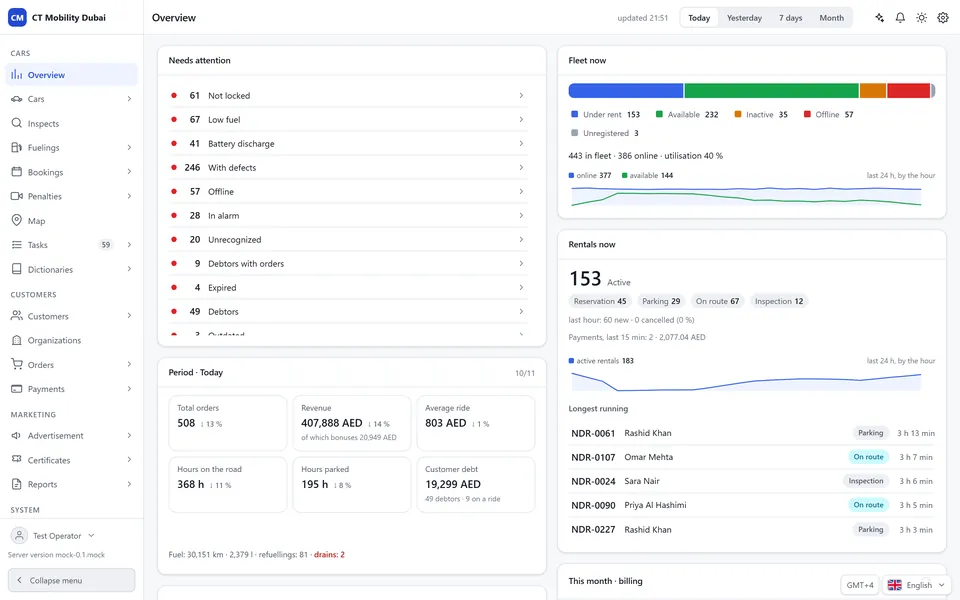
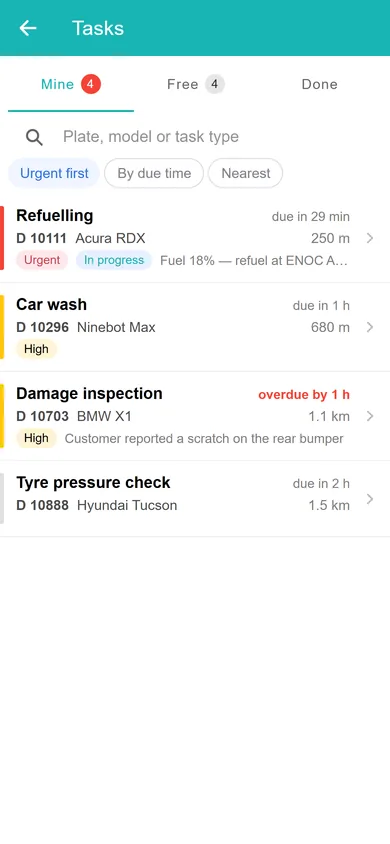
Fleet overview. Utilisation, active rentals, revenue in AED and the cars that need attention: the figures the assistant reads when you ask about your fleet. Technicians get a prioritised task list.
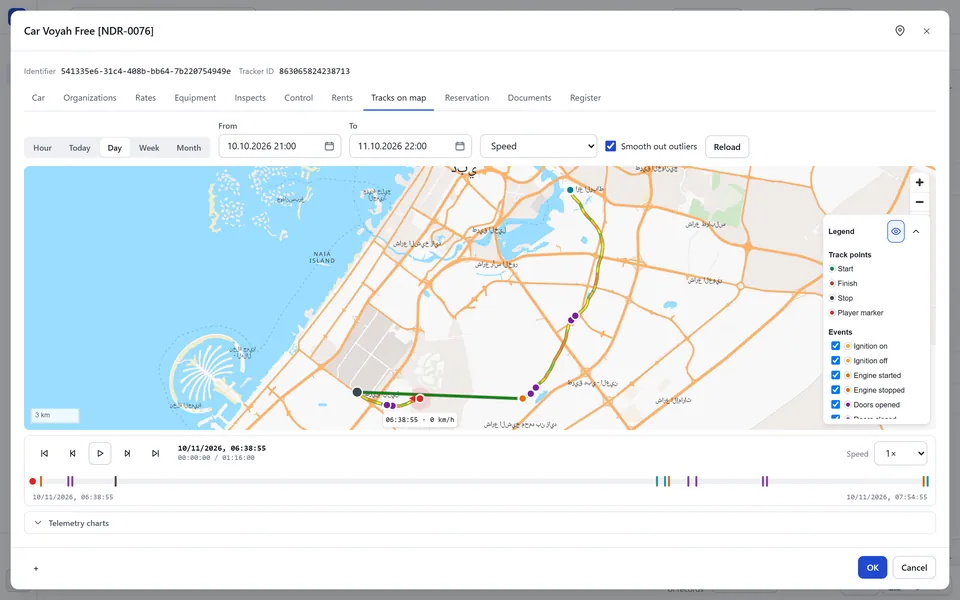
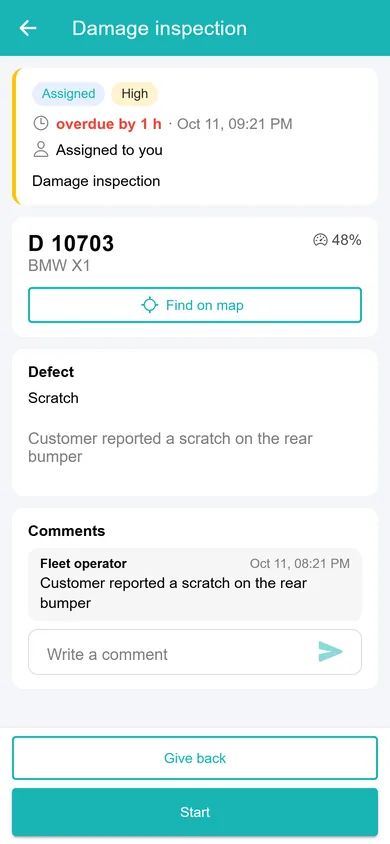
Trips and events. Every trip is stored with ignition, door and speed events, so a question like “who drove this car on Tuesday?” has a recorded answer. Damage reports become tasks for the team.
Ask your fleet is the MCP server built into CT Mobility, for car sharing, car rental and scooter, bike and moped sharing. Each employee adds the installation address + /mcp in ChatGPT, Claude or another MCP client and signs in with their own login, so the AI sees exactly what that person may see: vehicles, trips, customers, payments, fines, zones, tariffs, technicians and alarms.
A new connection can only read. Changes and commands work only if the employee allowed them when connecting, each one waits for a confirmation, and commands such as opening a car also record a reason. Every call goes into the audit log with who, when, which tool, the arguments with secrets masked, and the result. The server runs inside your installation and doesn’t copy your database anywhere. We enable it per installation, on request.
To see a change go through end to end, read the evening tariff test in Dubai Marina. For quick answers inside the control panel there’s the AI Data Assistant. By vertical: AI car sharing platform, AI car rental software and AI scooter and bike sharing software.
CT Mobility Solutions F.Z.C. · E-Commerce Hub BC-8, Ajman Free Zone C1 Building, Ajman Free Zone, Ajman, United Arab Emirates
No. An operator’s MCP server is for staff, each working under their own login. A chatbot that talks to renters or riders is a different product with different risks, and CT Mobility’s MCP server isn’t meant for that.
Not with a platform that has a built-in MCP server. With CT Mobility, once we’ve enabled the server for your installation, each employee adds the installation address + /mcp in their AI client and signs in.
There’s no public price. We enable it per CT Mobility installation on request, so the quickest way to find out is to book a demo from the Ask your fleet page and ask about your fleet.
We have repeatedly proven this in practice with dozens of launched projects and years of successful work. Ask our clients who have tried several IT solutions but still remain with us.




