Sooner or later someone asks the office: who had the white sedan on Tuesday afternoon? A trip log in Excel can answer that if it was set up with the right columns and a few checks. Below is the sheet we'd build, the formulas to paste, a month of trips with one typo in it, and the point where we'd stop using a spreadsheet.
Short answer: One row per trip with the date, car, driver, time out and time in, start and end odometer, kilometres as a formula, purpose and destination; fuel added, Salik or Darb crossings, parking and a notes column complete the log.
Last updated:
November 22, 2026

Every column below answers a question that someone will ask later: finance, HR, the driver or you. If a column answers nobody's question, leave it out.
| Column | Why it is there |
|---|---|
| Date | Type it as a real date (dd/mm/yyyy). A date typed as text is skipped by the monthly totals, and you won't notice. |
| Car | A short name or the plate, picked from a list. For a formula, “Pool 1” and “pool1” are two different cars. |
| Driver | The person who drove this trip. The employee the car is assigned to may not be the one at the wheel. |
| Time out, time in | A Salik crossing or a camera fine comes with a date and a minute. Without times you can't say which trip it belongs to. |
| From, to | Enough to recognise the trip a month later: “Office, Business Bay” to “Jebel Ali”. |
| Purpose | A short list: client visit, site visit, airport, service, approved private use. Free text turns into forty spellings of the same thing. |
| Odometer start, odometer end | Read from the dashboard. The start of a trip should equal the end of the previous trip of the same car. |
| km | A formula, never typed by hand. |
| Fuel added (litres) | From the receipt. Some companies keep fuel on a separate sheet with the amount and the fuel card reference; that works too. |
| Salik or Darb crossings | The number of crossings, or “see statement”. The amount charged comes from the Salik statement or the Darb account anyway. |
| Parking (AED) | What the driver paid and will claim back. |
| Notes | A warning light, a new scratch, a change of route. Short, in plain words. |
And the columns we'd keep out of the trip log:
Our free vehicle log book template already has these columns, drop-down lists for cars, drivers and purposes, and the checks described below.
Put everything in one workbook per year. The trips go on one sheet called Trips, one row per trip, the header in row 1. A second sheet, Lists, holds the cars in one column and the drivers in another. A third sheet, Summary, holds the monthly totals.
We'd avoid a sheet per month. It looks tidier, but the odometer check can't see the last trip of the previous month, and every total has to point at twelve sheets.
The columns of the Trips sheet in the formulas below: A date, B car, C driver, D from, E to, F purpose, G time out, H time in, I odometer start, J odometer end, K km, L gap, M check, N fuel added, O Salik or Darb crossings, P parking, Q notes.
Lists first. Select the car names on the Lists sheet and give them a name in the Name Box, say Cars; do the same for Drivers. Then select column B on Trips, open Data > Data Validation, choose List and type =Cars as the source. Column C gets =Drivers. Now nobody can type “pool1”, and a new driver is added once, on the Lists sheet.
A second rule on the odometer end (column J): Data Validation, Custom, formula =J2>=I2. Excel then refuses an end reading lower than the start.
Then three formulas in row 2, filled down:
=IF(OR(I2="",J2=""),"",J2-I2)=IF(OR(B2="",I2=""),"",IFERROR(I2-LOOKUP(2,1/($B$1:B1=B2),$J$1:J1),"")). It finds the last row above with the same car and subtracts that trip's end reading from this trip's start. Zero means the chain is intact. Anything else means kilometres that nobody logged, or a reading typed wrong.=IF(K2="","",IF(K2<0,"End below start",IF(K2>500,"Over 500 km",IF(AND(L2<>"",L2<>0),"Gap "&L2&" km","")))). 500 km is our limit for a pool car that stays in town; put in the longest trip your cars really do.The gap formula only works if the trips are entered in date order. If someone adds last week's trip at the bottom, sort the sheet by date and time before you read the check column.
On the Summary sheet, put the first day of the month in B1 (01/11/2026), the cars from A4 down and the drivers further down. Trips per car, in B4:
=COUNTIFS(Trips!$B$2:$B$5000,$A4,Trips!$A$2:$A$5000,">="&$B$1,Trips!$A$2:$A$5000,"<"&EDATE($B$1,1))
Kilometres per car, in C4:
=SUMIFS(Trips!$K$2:$K$5000,Trips!$B$2:$B$5000,$A4,Trips!$A$2:$A$5000,">="&$B$1,Trips!$A$2:$A$5000,"<"&EDATE($B$1,1))
Swap column K for L and you get the gap kilometres of the month; N gives fuel, O the crossings. For drivers, use the same formulas with column C in place of B. Change B1 to the next month and the whole summary follows. If your year has more than 5,000 trips, make the ranges longer.
Last, freeze the header: View > Freeze Panes > Freeze Top Row. In February the column names will still be on screen at row 900.
An office in Business Bay with two pool cars and three staff who use them, November 2026. The cars, people and numbers are illustrative.
| Date | Car | Driver | To | Odometer start | Odometer end | km | Check |
|---|---|---|---|---|---|---|---|
| 02/11 | Pool 1 | Sara | Dubai Marina | 31,250 | 31,296 | 46 | |
| 03/11 | Pool 2 | Omar | Jebel Ali | 18,400 | 18,471 | 71 | |
| 04/11 | Pool 1 | Priya | DXB Terminal 1 | 31,296 | 31,329 | 33 | |
| 09/11 | Pool 1 | Omar | Sharjah | 31,329 | 31,401 | 72 | |
| 11/11 | Pool 2 | Sara | Al Quoz | 18,471 | 18,498 | 27 | |
| 16/11 | Pool 1 | Sara | Dubai Marina | 31,401 | 34,145 | 2,744 | Over 500 km |
| 18/11 | Pool 1 | Priya | Dubai Silicon Oasis | 31,445 | 31,490 | 45 | Gap -2700 km |
| 23/11 | Pool 2 | Omar | Jebel Ali | 18,498 | 18,569 | 71 | |
| 26/11 | Pool 2 | Sara | Deira | 18,569 | 18,601 | 32 |
The Monday row was flagged as soon as Sara typed it, because 2,744 km is a lot for a trip to the Marina and back. On Wednesday Priya's row showed a gap of minus 2,700, which pointed at the reading that was wrong. The conversation took a minute:
“Sara, Pool 1 on Monday. Did it really come back at 34,145?”
“No, 31,445. I swapped two digits.”
“Priya started at 31,445 today, so that fits. I'll correct it.”
After the correction Monday's trip is 44 km, both checks are empty, and the summary for November reads:
| Car | Trips | km | Gap km | Fuel added (litres) | Salik crossings |
|---|---|---|---|---|---|
| Pool 1 | 5 | 240 | 0 | 35 | 7 |
| Pool 2 | 4 | 201 | 0 | 30 | 5 |
| Total | 9 | 441 | 0 | 65 | 12 |
Per driver, Sara made 4 trips and 149 km, Omar 3 trips and 214 km, Priya 2 trips and 78 km. Pool 1's odometer went from 31,250 to 31,490, which is the same 240 km as the sum of its trips.
Before the correction the summary showed 2,940 km for Pool 1 and minus 2,700 in the gap column. Add the two and you get 240 again, the odometer distance. When kilometres plus gaps equal the odometer distance, the trips are all there and one reading is wrong. When they don't add up, some kilometres were never logged.
If you start tomorrow morning:
For a handful of cars and one coordinator who checks the sheet every Friday, Excel does the job. These are the moments when it stops doing it.
More than one person edits the file. The sales coordinator has it open on the shared drive, the projects coordinator saves a copy called “Trip log (2)”, and a week later there are two versions of November. Moving the file to Google Sheets fixes the editing, but none of the problems below.
Cars change hands during the day. Pool 1 goes out at 09:00 with Sara, comes back at 12:10 and leaves again at 12:30 with Omar. If the times are rounded to the hour, a camera fine at 12:20 falls into nobody's trip, or into both.
Fines and Salik have to be matched to the driver by time. A spreadsheet can do the lookup. Our template has a sheet where you type the date and time from the notice and it shows whose trip covers that minute. The answer is only as good as the times typed in. When nobody can be named, the fine stays with the company, or someone spends a morning on WhatsApp asking who had the car.
The log is filled in at the end of the week. A row written on Thursday for Monday says “around 9” and an odometer reading rounded to the nearest hundred. The gap check then fires every week, and people learn to ignore it.
Keys and bookings live somewhere else. The key box at reception has its own register, bookings happen in a chat group, and the trip log is a third record. When the three disagree about who had the car, the trip log is usually the one that was written last.
None of this shows up as a line on an invoice. It shows up as the coordinator's hours, as fines the company pays because no trip covers the time, and as arguments with employees about a charge they don't remember.
Inside the platform · demo data
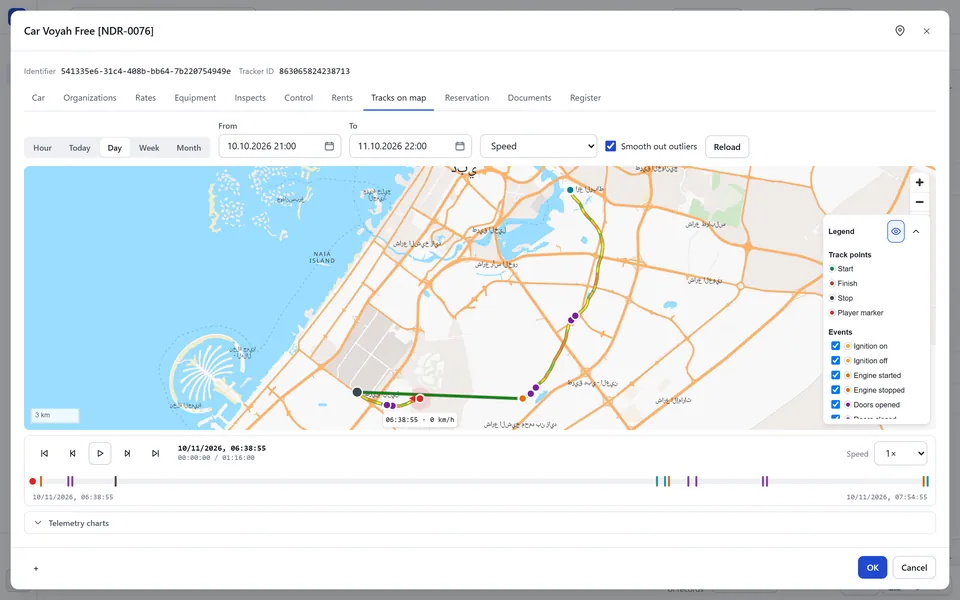
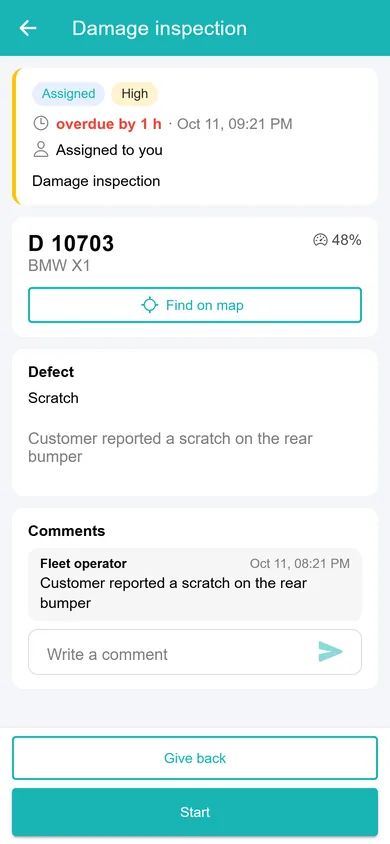
Trip history. Replay any trip with ignition, door and speed events to see exactly who drove and how. Damage reported by a customer becomes a task for your team.
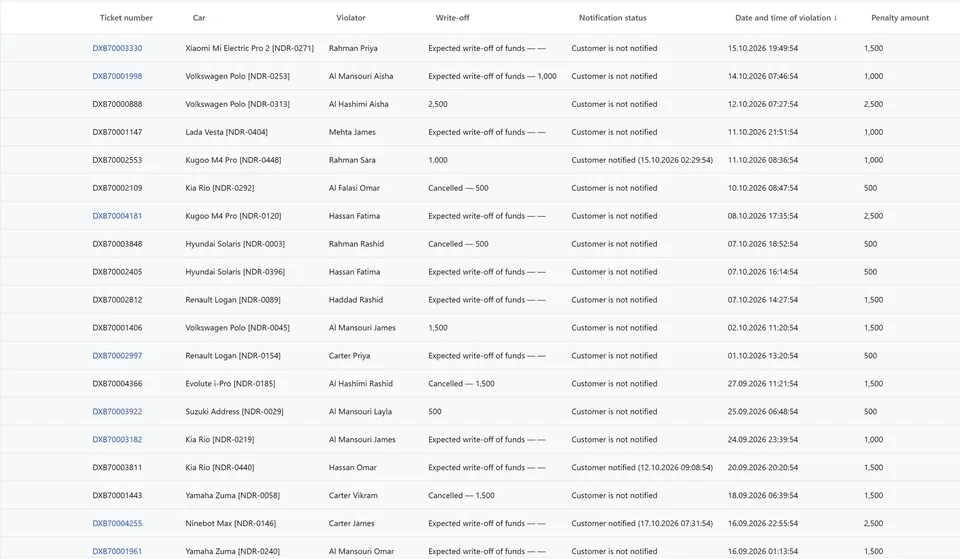
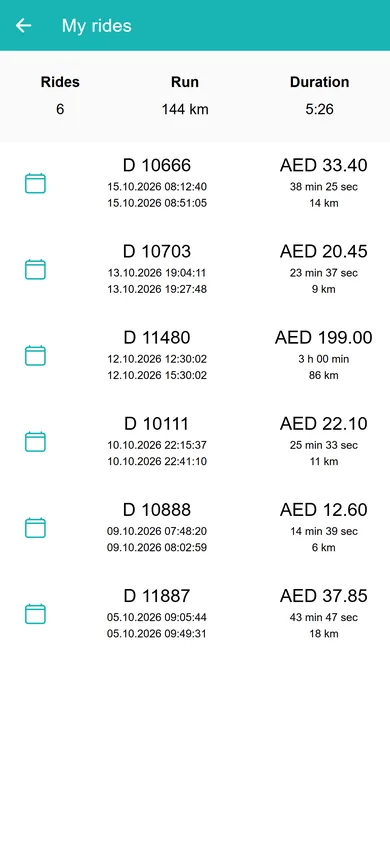
Fines matched to drivers. Each unpaid fine is matched to the car and to the driver who had it at the time of the violation, with the amount in AED. Drivers see their own trips with time, distance and cost in the app.
There is a free middle step. Our online vehicle log book runs on a phone: the driver logs who drove, why, where and the odometer at the start and at the end, and the distance, the monthly totals and the kilometres nobody logged are calculated. The log stays on that device and is not uploaded anywhere, so each phone keeps its own.
In CT Mobility nobody types the log. An employee books a pool car in the app, passes a selfie liveness check and opens the car with the phone. Every trip keeps who booked the vehicle, the start and end time, the route and the mileage. When a fine or a Salik charge arrives, your team takes the plate and time from it and finds the trip in the trip history; the platform does not pull statements from the authorities. Trip and driver reports can be exported. See pool car management in the UAE.
Pilot for UAE companies: we connect up to 2 of your vehicles with no subscription fee for 3 months, so you can judge the results on your own operations before any commitment. Only the hardware, installation and mobile data are paid. Go live in about 15 days.
CT Mobility Solutions F.Z.C. · E-Commerce Hub BC-8, Ajman Free Zone C1 Building, Ajman Free Zone, Ajman, United Arab Emirates
For two or three cars, it can be, as long as someone types or checks the month in a spreadsheet. On paper nobody sees a swapped digit or a missing trip until the month is closed. The template is also available as a printable PDF.
The driver, at the car, at the start and at the end of the trip, while the odometer and the clock are in front of them. The coordinator reviews the flagged rows once a week and closes the month.
That is your company's policy. The log can support expense claims, fines charged back to employees and vehicle costs in the accounts, so ask your accountant or legal adviser how long those records must be kept.
We have repeatedly proven this in practice with dozens of launched projects and years of successful work. Ask our clients who have tried several IT solutions but still remain with us.




